
I did not switch to a split keyboard and immediately love it.
It took a while to get comfortable. The first couple of weeks felt like I had messed up something that used to be automatic. I was slower, certain keys felt wrong, and I kept running into little typing habits I had clearly been getting away with for years.
Why even do this in the first place?
I mostly ended up here because my wrists were killing me.
It had been building for a while, especially in my left wrist, and eventually it got bad enough that I took a day off work because typing hurt way too much. My pinkies were part of it too. I was stretching for modifiers all day without really noticing how much strain that added until it got bad enough that I could not ignore it anymore.
That was what pushed me toward an ergonomic board in the first place.
The one I bought was the Iris SE. A big reason I picked it was that it still felt like a keyboard I could care about. I could use my own switches, my own keycaps, and remap it however I wanted. A lot of ergo keyboards do not really give you that. Some are a lot more locked down, and some use switch options I am just not interested in.
I already own a bunch of custom mechanical keyboards that I built myself, so typing feel matters a lot to me. I did not want to solve the wrist pain problem but end up with a keyboard I hated using. The Iris let me try a split board while allowing me to still be a keyboard snob.
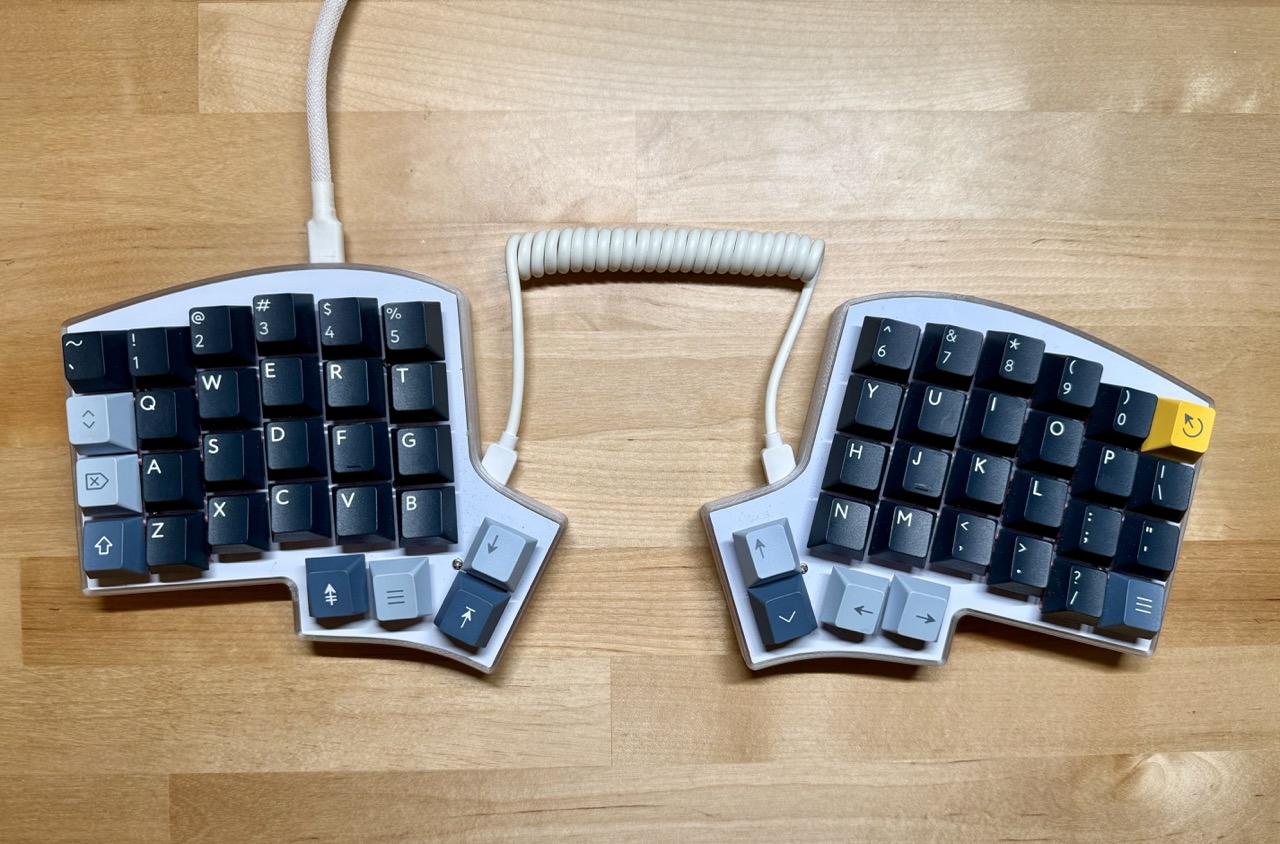
The first adjustment was just the layout itself
A lot of the early friction came from the layout.
The Iris uses an ortho linear layout, so even though the keys are still in roughly familiar places, they are not staggered the way they are on a normal qwerty board. That took some getting used to. It immediately exposed where I had been cheating before and just reaching with whatever finger happened to get there first. B and Y felt especially strange at first. I also assumed that having two separate space keys was going to feel weird, but that part settled in faster than a lot of the other changes.
The stock layout was not going to work for me
The default mapping got me started, but it did not take long before I knew I was going to have to change it.
The thumb cluster was the biggest problem early on. On paper, having modifiers down there sounded good. In practice, it still had me moving around more than I wanted. I use the option key constantly with Aerospace to move between windows and workspaces, and having that in the thumb cluster got annoying pretty quickly.
That is what pushed me back toward home row mods. If you have not used them before, the idea is pretty simple: your home row keys act like normal letters when you tap them, but act like modifier keys when you hold them. So instead of reaching down for command, option, or control all the time, those can live directly under your fingers.
I had tried home row mods before on a regular keyboard, but I had done it with software on my machine instead of programming the behavior into the keyboard itself. That difference turned out to matter a lot. The old setup felt laggy and easy to mistype on. This time I set it up through VIA so the behavior lived on the board. It felt a lot more solid right away.
Once I did that, home row mods started making sense to me.
Home row mods mostly clicked
At first I put shift, control, option, and command on the home row.
Most of that worked really well. Having those modifiers on both sides meant I could hit shortcuts without much reaching at all. The one that never really clicked was shift.
It was not unusable. It just turned typing into this weird dance where I had to think about which hand should be holding shift while the other one typed the letter. That slowed me down too much and made something simple feel weirdly deliberate.
What worked much better was moving shift off the home row and putting it on a long press of either of the main thumb keys.
That kind of long-press behavior is one of the nicest parts of having the board programmed properly. One key can do more without making your hands move more. In practice that meant less stretching, less reaching, and a lot less pinky use. That mattered more than I expected. I went into this mostly thinking about wrist pain, but the pinky strain was real too.
Training took time
I spent a lot of time on Keybr during the first month, and that helped a lot.
I tried Monkeytype first, but mostly just got confirmation that I was bad at this. Keybr helped more because it kept forcing me into the letters and transitions I was actually weak on instead of letting me stay in patterns I already kind of knew.
It still took a while. I would say it was about a month before I felt as efficient on the split board as I had been on a normal qwerty keyboard.
Symbols were the hardest part, especially when writing code
The biggest thing that slowed me down was symbols.
Letters came back with practice. Symbols were harder because there is not room on a board like this to keep them where they normally live on a standard keyboard, so they have to move into layers. Before this I had never really used layers in a serious way, which meant I had no muscle memory there at all.
Brackets, parentheses, and the equals sign were the ones I felt the most. My first attempts at laying them out were based on what seemed easiest to remember. For a while I tried putting things on keys that matched the name, like brackets on B and curly braces on C. That made them easier to remember, but still not very nice to type.
What finally clicked was splitting them across both hands in a way that felt physically consistent. On the symbol layer, my left hand handles opening delimiters and my right hand handles closing ones. Left paren on the left, right paren on the right, same idea for brackets and braces. That ended up making a lot more sense than trying to remember some clever layout.
Once I moved those symbols into places that were comfortable to hit instead of just easy to memorize, the layer started feeling usable.
Configuring it felt like configuring any other software I use
I realized pretty quickly that the keyboard was never going to become great for me if I treated the stock layout like something sacred.
That part actually felt familiar. I already do this with software all the time. Neovim, tmux, Ghostty, whatever it is, I like shaping tools around how I actually use them instead of just accepting the defaults because they’re shipped that way. Configuring the keyboard ended up feeling exactly like that.
Once I started thinking about it that way, remapping stopped feeling intimidating. It just felt like tuning. Every little change was there to make some motion feel more natural, reduce reaching, or speed up something I do all the time. That also made the remaps easier to remember. They were solving real annoyances I had already felt, not abstract problems I thought I might have later.
That ended up being a huge part of why the keyboard worked out for me. The board mattered, but getting the layout to fit how I actually work mattered just as much.
Where I landed
At this point I use the split keyboard every day.
I am way more proficient on it now than I expected to be. I bring it to coffee shops with me when I work. It is not some desk-only thing anymore. It is just my keyboard.
Home row mods combined with Aerospace turned into a huge productivity unlock too. Once option was in a comfortable place, switching programs stopped being this clunky cmd+tab shuffle or, worse, something that made me reach for the mouse. Now it is things like opt+b for browser or opt+t for terminal. Every app is a single shortcut away. Doing that on a normal qwerty layout would have felt awful, especially with the modifier keys crammed into the bottom left where they were already bothering my hands.
Once that clicked, I ended up changing my monitor setup too. With the keyboard and window management feeling efficient enough, I went back down to a single 16:9 monitor. That helped my focus a lot. I am moving around the system faster, but I am also looking at less at once, which has been a much better trade than the multi-monitor setup I was using before.
The other nice surprise is that learning this layout never broke normal qwerty for me. I can still switch back and type fine. It just feels like two separate kinds of muscle memory. And the original reason I did any of this really did get solved. I do not get wrist pain when I am using the ergo board now, but I can still feel that old pain come back if I spend too long on a normal keyboard, especially a laptop keyboard and especially in my left wrist.
That was the main reason I bought it. I just did not expect it to change so many other parts of how I work too.